Preview
Loading Angle Asteroids
Portfolio Entertainment System
★ Featured
Angle Asteroids
Studio:Playpower LabsRole:Unity Developer
Educational game about angles, built as sole engineer, with ScriptableObject levels, interface-based health and weapon systems, and object pooling.
Tech Stack
- Unity
- URP
gallery
what i did
Chapters Read0/6
An educational game that teaches angles on the Cartesian plane. Players rotate a ship to the correct angle and shoot incoming asteroids before they hit, across increasingly difficult levels.
Key Contributions
- Sole engineer: architecture, implementation and deployment.
- Built all core gameplay systems from scratch, with extensibility, performance and maintainability in mind.
- Worked closely with a 2D artist, keeping game logic independent of the art.
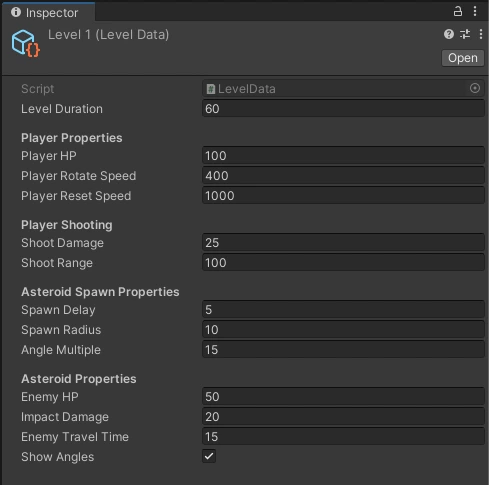
- Levels are ScriptableObject assets, kept separate from runtime gameplay code.
- Designers and non-programmers add, remove and reorder levels in the Inspector.
- Level metadata lives in one place, which made iteration and balancing quick.
- A generic
IHealthinterface for everything that can take damage. - Damage sources (weapons, collisions) don't know about health implementations, so each entity handles damage its own way without branching logic.
- Health events trigger feedback such as audio and camera effects.
public interface IHealth
{
    float HP { get; }

    event Action<float> OnHpPercentChanged;
    event Action<Vector2> OnHit;
    event Action OnDeath;

    void SetInitialHp(float hp);
    void TakeDamage(float damageValue, Vector2 contactPoint);
}- Weapons implement
IWeapon, so new types can be added without changing existing code. - Targeting is separate from firing.
- The laser is built with Model-View-Presenter on URP:
LineRenderers draw the beam and raycasts damage anything withIHealth.
public interface IWeapon
{
  float WeaponRange { get; set; }

  void Shoot(float damageMultiplier);
  void ResetState();
}Everything spawned often is pooled, to avoid constant allocations and garbage collection.
Asteroids
- Spawned from each level's spawn settings, with a random direction, position and visual variant.
- Reused from a pool instead of instantiated.
Explosions
- Requested through events when an asteroid is destroyed.
- Particle instances are pooled, which removed noticeable GC spikes during busy gameplay.
- Custom input slider that extends Unity's
SliderwithIDragHandlerandIEndDragHandler. - Responsive UI across device resolutions.
- Tutorial on first launch.